
Deepswap 2026 Review: Features, Pros, Cons and Much More..
Deepswap 2026 Review: Features, Pros, Cons and Much More..
Deepswap Tools:
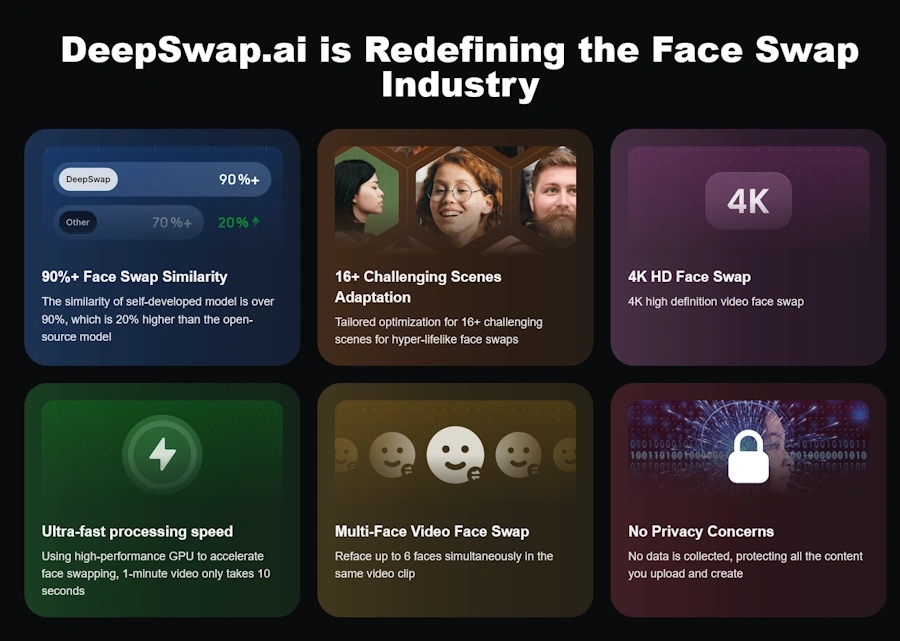
Drop a photo, pick a target face, get a clean result in under 5 seconds. Quality holds up at 4K with the HD Face mode turned on. Multi-face support means group photos work without splitting them. You can upload photos and GIFs up to 20 MB. The output results are excellent. It also supports batch face swapping.
Browser-based face swap that handles up to 6 faces in one clip. Processes a one minute video in roughly 9 to 10 seconds on the cloud GPU. Tracks expressions and lighting better than most competitors in this price range. Video Face swap up to 45 minutes! You can upload videos of maximum 1,5 Gb or 45 minutes long. Very accurate tool.
Maybe the only site that features this tool for VR content. Upload and reface your VR videos up to 30 minutes or 60 GB and with format: MP4/MOV/MKV.
Maximum length 10 seconds. Output quality up to 1080px. You can use an external photo as a reference or create one from scratch using tags or a prompt line.
Three image editing features are available beyond face swap: background removal, resolution enhancement, and images cartoonizer.



Deepswap Pros & Cons
✓ Pros
- • Best in class realism for browser-based face swap
- • Handles up to 6 faces in a single clip
- • Support and privacy
- • Video face swap up to 45 mins
- • VR face swap feature
- • No content restrictions or moderation lectures on uploads
- • Crazy fast processing: 9 to 10 seconds per minute of video
✗ Cons
- • Slow support
- • No dedicated image generator
- • No chat
- • No free trial
- • Credits are not purchasable one-time. If you finish them you've to wait the renew.
DeepSwap: Is the Web’s Most Hyped Face Swap Tool Actually Worth the Credits?
I went into DeepSwap with low expectations. Face swap tools have been around since 2018, and most of them still output content that screams “AI did this” the moment a face turns sideways. The first test I ran was a 20-second clip with two people in conversation, varied lighting, and one of them eating. Classic torture test. DeepSwap rendered it in 12 seconds, and the result was the cleanest I’ve seen from a browser tool. Not flawless, the chewing motion got slightly weird for half a frame, but the overall identity transfer held up across the whole clip.
That’s the headline. The rest of this review is about whether the experience justifies the credit system, which is where most users get burned.
The first thing you actually see
Sign up with Google or email, takes 15 seconds. The top menu is clean and uncluttered: Face Swap, VR Face Video Generator, AI Pic Tools, and Pricing. No tutorials, no pop-ups asking you to verify you’re a real person. Upload, swap, download. No tutorial gate, no pop-ups asking to verify you’re a real human. You upload, you swap, you download, but forget the free trial or daily credits.
DeepSwap Pricing 2026
DeepSwap works with monthly credits, not one-time top-ups. There’s only one subscription plan, offering 20 credits per month, and you can pay monthly or annually to save a little. With DeepSwap, you’ll never have to worry about which plan to purchase…there’s only one!
| Plan | Price | Credits / Month |
| Standard | $9.99 / month | 20 |
| Annual Standard | $49.99 / year | 20 |
Quick math on credit burn: a 30-second video at HD costs around 6 to 40 credits, depending on resolution, audio presence, and number of faces. A 3-minute Pro video can eat up your entire monthly allocation in a single render. Plan accordingly or budget for refills.
These are the costs per feature taken directly from the site.
What Each Tool Actually Costs You
Below you’ll find the costs of the tools available on DeepSwap, expressed in credits. Please note that the subscription plan offers 20 non-reloadable monthly credits.
| Feature | Credits Charge |
| Face Swap | Video: 1 Credit / 15s Photo: 0.1 Credit GIF: 1 Credit Credit charges are the same for all models and HD Face options. |
| VR Face Swap | 2 Credits/15s 6 Credits/15s |
| Video Generator | DeepVid 2.0: · No Audio: 1 Credit / 5s · With Audio: +0.2 Credits / 5s DeepEcho (Audio included): · 720P: 2 Credits / 5s · 1080P: 2.5 Credits / 5s · Re-add Audio: +0.2 Credits / 5s DeepEcho Lite (Audio included): · 720P: 1.5 Credits / 5s · 1080P: 2 Credits / 5s · Re-add Audio: +0.2 Credits / 5s Reference to Video: · 720P: 2.5 Credits / 5s (+2.5 with video reference) · 1080P: 3.5 Credits / 5s (+3.5 with video reference) |
| AI tools | 0.1 Credit per Photo |
How a Real Session Goes
- Upload your base media. Video, photo, or GIF. Max file size is generous (most users won’t hit it). Supported formats are the standard MP4, MOV, JPG, PNG, and GIF.
- Upload the target face. A clear front-facing portrait works best. Side angles or shadowed faces tank the result. This is the single biggest factor in output quality.
- Select which faces to swap. DeepSwap auto-detects every face in the source. Click the ones you want to replace, leave the rest alone.
- Pick HD Face mode if your source is HD. Otherwise, the output gets downscaled. This option saves the result on professional footage.
- Hit Generate. Wait 10 seconds for short clips, up to a minute for longer videos. Side-by-side preview appears when done.
- Download immediately. Files get deleted from DeepSwap servers within a short window. If you don’t grab it, it’s gone.
Detailed Quality Feature Scores
| Feature | Score | Quick Take |
| Realism (Front-facing) | 9.2 | Genuinely impressive, 90%+ identity match on clean footage |
| Realism (Profile / 45°) | 9.0 | The algorithm has full-angle recognition, which ensures smooth face swaps at all angles |
| Speed | 9.0 | 10 seconds per minute of video is unmatched in browser tools |
| Multi-Face Handling | 8.5 | Up to 6 faces tracked simultaneously, also in videos. Rare in this price range |
| HD / 4K Output | 9.0 | Up to 4K output resolution for images and HD for videos. It depends on your upload quality |
| Privacy | 7.8 | Auto-delete is real but not instant. They ensure your content’s full privacy |
| Customer Support | 6.5 | The weakest link. Slow responses, painful refund process |
| Ease of Use | 8.0 | Anyone can run it within 2 minutes of signing up. Prompt input knowledge is required for video generation. |
Privacy and What Happens to Your Uploads
DeepSwap states that uploaded files are processed on temporary servers and deleted after the output is generated. In practice, this means files live on their systems for a little while. You can manually delete content from your dashboard, and full account deletion wipes everything tied to your account. There’s no granular retention toggle or per-file auto-delete switch, which the privacy-conscious will note.
Below that’s what the site claims about that:
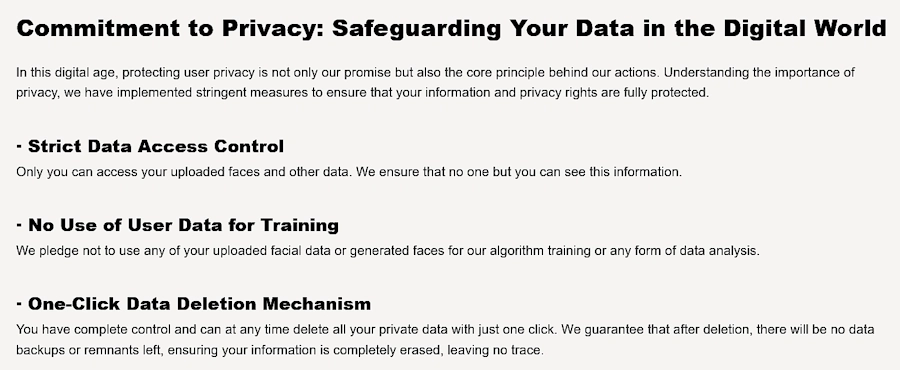
Our advice is still not to upload anything you wouldn’t want sitting on a third-party server for a few hours.
Who DeepSwap Is Actually For
Content creators and meme makers: this is the sweet spot. Fast turnaround, viral-ready output, easy to use under a deadline.
Social media managers: face swap for campaign creative or A/B variants. The Pro tier multi-face feature makes this viable for branded content with multiple talent.
Filmmakers and indie editors: useful for quick previz or proof of concept, not for final delivery on professional work. The lack of frame-level control is a real ceiling.
NSFW creators: DeepSwap’s unrestricted upload policy has made it popular in adult content circles. The tool doesn’t moderate inputs. This is a strength or a liability depending on your stance.
Avoid if: you need long-form video swapping on a tight monthly budget. The credit system will drain you fast.
DeepSwap vs The Competition
| Tool | Best For | Price | Weakness |
| DeepSwap | Fast, realistic web-based face swap | $9.99/mo | The credit system burns fast |
| Reface | Quick mobile memes | Freemium | Mobile only, lower realism |
| FaceFusion | Power users with hardware | Free, open source | Steep learning curve, local install |
| HeyGen | Pro avatar videos for business | $24+/mo | Wrong tool for face swap, different use case |
| FaceMagic | Casual photo swaps | Freemium | Limited video, weaker on multi-face |
| DeepFaceLab | Maximum quality | Free, open source | Hours of setup, requires a powerful GPU |
DeepSwap wins on the “no setup, just works in a browser” axis. If you have a beefy local GPU and weeks to learn it, FaceFusion or DeepFaceLab give you more control for free. Everyone else lands on DeepSwap.
Final Verdict: 8.8/10
DeepSwap is the most polished browser-based face swap tool available right now. Speed, realism, and multi-face support put it ahead of every competitor that doesn’t require a local install. The output quality on clean, well-lit footage is genuinely surprising the first time you see it. For casual creators, meme makers, and anyone who needs fast but accurate face swaps without learning local software, it’s an easy recommendation.
The disadvantages, however, are real. The credit system has a huge limitation: it can’t be reloaded occasionally. If you run out of credits, you’ll have to wait for a new one when your subscription renews.
This severely limits the amount of content you can create. We believe it’s a corporate choice aimed at containing the site’s computing costs; otherwise, we wouldn’t understand it. A free trial would also be appreciated.
Deepswap FAQs
Best Deepswap Alternatives in 2026
These are currently the best deepswap competitors

Deepswaper 7.7★
They have similar name, and their features are similar, but deepswaper is easyer to handle ...read full review
Users' Opinion
No reviews yet. Be the first to share your opinion!
No reviews yet. Be the first to share your experience!
Rate & Comment
Thank you!
Your review has been submitted and is awaiting moderation.